Expand Your Games Storage in the UAE
The upcoming release of Grand Theft Auto VI is exciting for every PlayStation 5 owner. This new game will be incredibly large and will need a lot of storage space. Many players will see a frustrating “Not enough space” alert on their console. The standard PS5 does not have enough internal storage for many big games. You must expand your storage capacity to prepare for GTA VI and other future titles. This guide explains the simple process of upgrading your PS5 storage in the United Arab Emirates. We cover the parts you need, where to buy them locally, and the steps for installation. Follow this advice to ensure your console is ready for launch day without any storage problems.
GTA VI’s Huge Size Demands More PS5 Space
Game files are getting bigger every year. Grand Theft Auto VI is expected to be one of the largest games ever made. Industry experts predict it might need over 150 GB of storage space. Your standard PS5 console only has about 667 GB of usable space. This space fills up quickly with just a few modern games. You cannot play GTA VI if your console’s storage is full. Expanding your storage is not a luxury; it is a necessity. Planning this upgrade now prevents last-minute stress before the game’s release. Having extra space also improves your console’s overall performance and speed.
Understanding the PS5’s Storage Expansion Slot
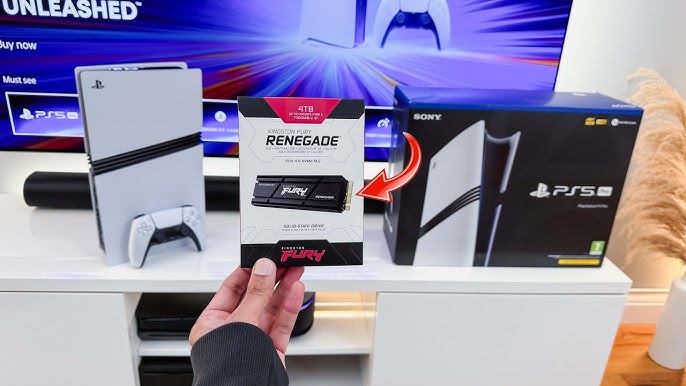
Sony designed the PS5 with a special slot for extra storage. This slot is for an M.2 Solid State Drive (SSD). It is located inside the console’s outer cover. Using this slot is the only official way to add more storage to your PS5. You cannot use regular external hard drives to play PS5 games. Those drives are only for storing PS4 games or backing up data. The M.2 SSD connects directly to the console’s fast internal systems. This allows the new games to run just as quickly as from the original storage. The installation process is straightforward and requires only a few common tools.
Choosing the Right M.2 SSD Drive in the UAE
You must choose a compatible M.2 SSD for your PS5. The drive needs to meet specific technical requirements. It must be a Gen4 PCIe NVMe SSD with a built-in heatsink. The storage capacity should be between 250GB and 4TB. Popular and reliable brands include Western Digital, Seagate, and Samsung. You can find these drives at many UAE electronics retailers. Check major stores like Amazon UAE, Microless, Virgin Megastore, and Sharaf DG. Always compare prices online before you make your purchase. Reading customer reviews helps you select a drive with good performance and reliability.
 Step-by-Step Guide to Installing Your New SSD
Installing the SSD is a simple physical process. First, turn off your PS5 and unplug all cables. Place the console on a clean, flat surface. Carefully remove the white outer cover to expose the internal slot. You will see the SSD bay cover on the console’s frame. Unscrew this small cover and set it aside. Insert your new M.2 SSD into the open slot at a slight angle. Gently press it down and secure it with the provided screw. Replace the metal cover and then reattach the white outer shell. Finally, plug your console back in and turn it on. The PS5 will automatically guide you through the software setup for the new drive.
Formatting and Setting Up Your New Storage
Your PS5 will recognize the new hardware when you restart it. The system software will prompt you to format the M.2 SSD. Formatting prepares the drive for use with your console. This process will erase all data on the drive, so ensure it is new and empty. Follow the simple on-screen instructions to complete the formatting. The process takes only a few minutes. After formatting, you can choose to install your games on the new drive. Go to your PS5’s storage settings in the system menu. You can set the new SSD as the default location for all future game downloads. This keeps your original storage free for the operating system and essential files.
Cost and Planning for Your Upgrade in the UAE
The cost of a good 1TB M.2 SSD in the UAE starts from around AED 400. Larger 2TB drives offer better value and cost approximately AED 700 to AED 900. Investing in a larger drive now is a smart decision for the future. This upgrade will serve you for the entire PS5 lifecycle. Consider this cost as part of your budget for GTA VI. It is much better than deleting other games you love to make space. With your new storage installed, you can pre-download GTA VI the moment it becomes available. You will be ready to play the second the game unlocks, with no storage errors or delays.